Activity reports
Introduction
The tool provides users with access to comprehensive activity reports which can be used to:
- Identify when data was submitted for validation
- Track the validation results
- Download copies of submitted and returned spreadsheets to check data versions
Accessing the reports
Every email has a link to access the reports. Simply click on the link, specify the required time period, and view the report

Report interface
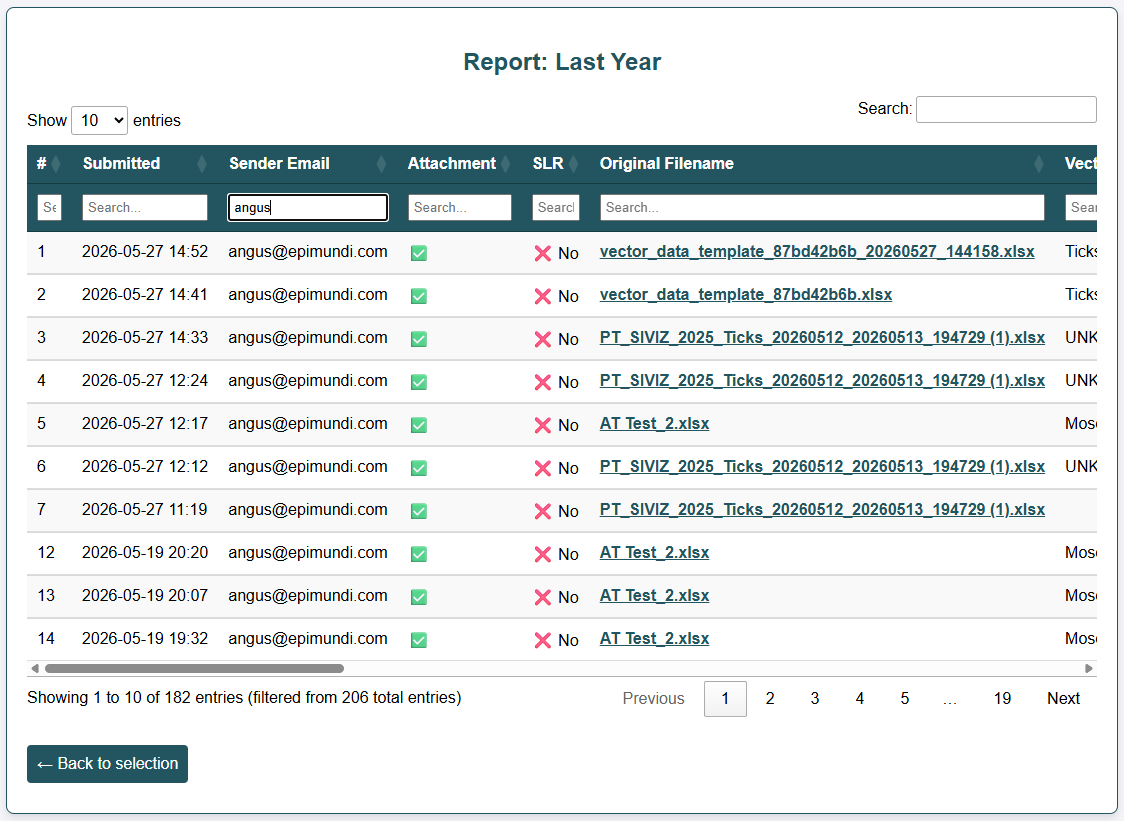
The interface allows you filter, sort, scroll and paginate the report table.
- To filter, type a value in the box at the top of one or more columns.
- To sort, click on the column header.
- To paginate, choose the number of items to include on the page, and then move between pages by clicking on the page number at the bottom right.
- To scroll across all the data, drag the bottom scrollbar left and right.
Report content
The report tracks the full life-cycle of data within the validation tool. Each row corresponds to an initial email sent to the validation tool.
Message description
Basic information about the email submitted:
- Submitted: Date/time email was received by the system.
- Sender Email: Email address of the data provider.
- Attachment: Whether there was an attachment
- SLR: Whether this was a submission for the SLR validation rule-set.
Data description
Information about the data submitted:
- Original Filename: The filename of the Excel file included in the email. Click to download.
- Vector Group: The vector group for the data (e.g. ticks, midges…)
- Dataset name: The automated name assigned to the dataset to track duplicate submissions
- Total rows: The total number of rows of data submitted
Automated validation
Information about the outcome of the automated validation:
- Annotated file: The filename of the annotated version of the data generated by the tool. Click to download.
- Errors: The total number of errors (of any sort) detected during the validation
- Warnings: The total number of warnings (of any sort) detected during the validation
- Alerts: The total number of alerts related to vector distribution detected during validation.
- Is Validated: Whether or not the submission has passed automated validation (i.e. no errors detected).
Manual validation
- Submitted for Manual Validation: The date/time the data was submitted for manual validation
- Validated by: The email address of the reference entomologist that did the manual validation
- Validated on: The date/time the manual validation was completed
- Validation status: Whether the data was successfully validated or if problems were detected
- Feedback filename: The filename of the annotated file prepared by the reference entomologist. Click to download.
Data duplication
- Potential duplicate: Whether this submission may be a duplicate of another submission, based on the sender, vector group, and number of records (in the absence of a matching datasetName value). The value references the row number of the potential duplicate dataset.